Tag Archives: Online Marketing Company

New Google AdSense Features That Strengthens Strategy

Google shared some product updates with new features for responsive ad units and a multi-screen optimization score to complement and strengthen your strategy.
Google-Adsense

Following are the new features for responsive ad units:

  • Product manager says “If your responsive page changes its layout following a screen orientation change, we’ll request and load a new ad to fit the new page layout.”
  • Smart sizing based on the space available: The ad code will automatically adapt all newly created responsive ad units to fit your page layout.
  • Your ad unit reports can now be broken out by the size of the ad served.
  • Multi-screen optimization score in publisher score card: A new multi-screen category –for example, if a user need to zoom and/or scroll often, this may negatively impact their experience. Your score will measure what percentage of your pages are multi-screen optimized and compare this percentage to that of other AdSense publishers.

Note: You may not see this category in your scorecard if you have a low percentage of mobile traffic on your site. This new score will be visible in the scorecard on your AdSense home page.
Bing Enabled Webmaster Tools To Track Data for Pages beyond Your Website.

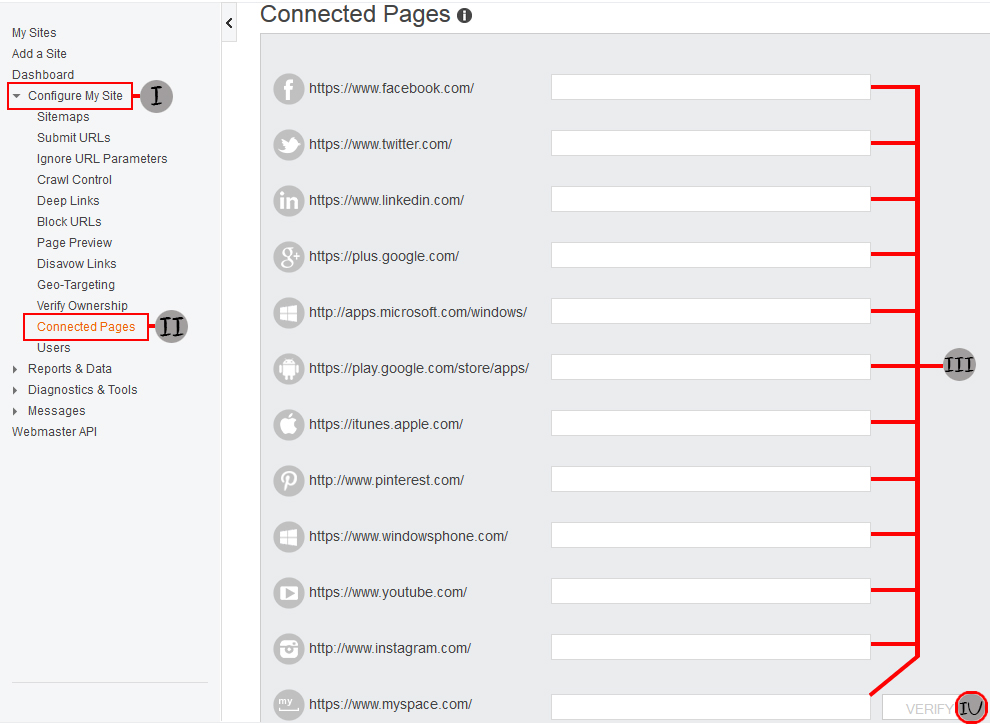
A new feature was announced in Bing Webmaster Tools called “Connected Pages” this new feature lets you claim and connect your official social media pages to your BWMT account so you see data as it relates to those connected locations.

Bingwebmastertools

Now you can connect a full range social media pages as long as those pages have a link back to your verified website, you need not provide Bing with any special permissions for your social media accounts, so your privacy is still fully intact.

Here is the list of social media pages that Bing’s connected pages currently support:

  1. Facebook
  2. Twitter
  3. LinkedIn
  4. Google+
  5. Windows Store
  6. Google Play
  7. Apple Store
  8. Pinterest
  9. Windows Phone Store
  10. YouTube
  11. Instagram
  12. MySpace

All you have to do is log into Bing Webmaster Tools and select connected pages and complete the URL path for the various media networks associated with your page on that network and click verify. This may take a few moments, especially if you fill out multiple networks at the same time.

The feature is available to users immediately, though it will take up to 72 hours for Bing Webmaster Tools to start populating the data related to connected pages.